Artificial intelligence has never been more accessible.
Just a few years ago, using advanced AI often required expensive software or specialized knowledge. Today, many of the world’s most capable AI tools offer free versions that anyone can use.
Whether you’re writing emails, creating images, editing videos, researching a topic, or looking to become more productive, there’s an AI tool designed to help.
The challenge isn’t finding an AI tool—it’s figuring out which ones are actually worth your time.
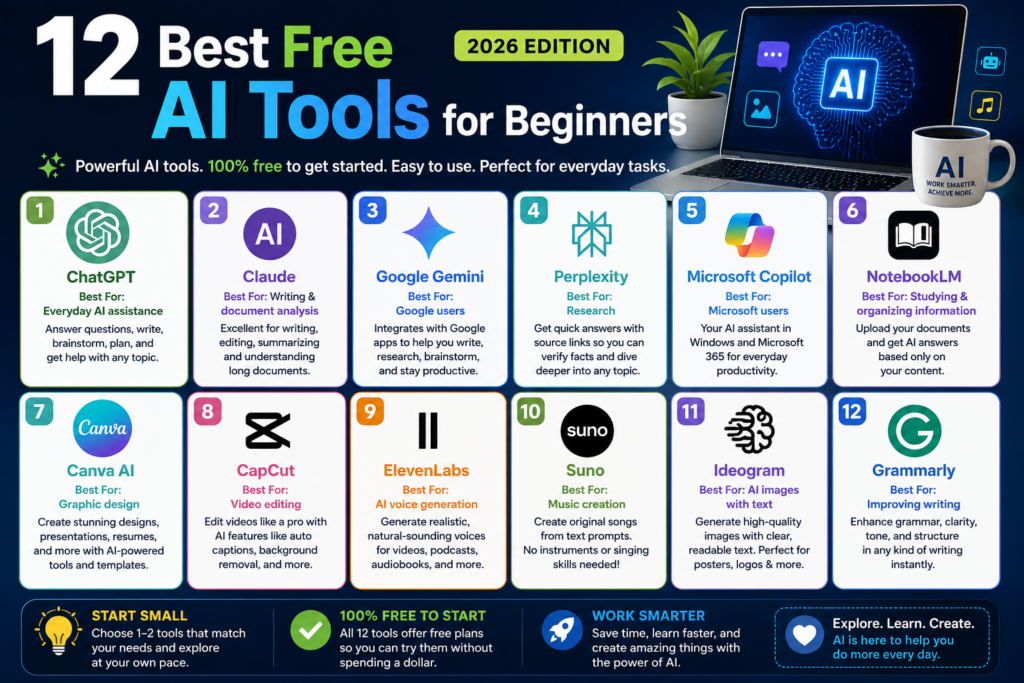
In this guide, we’ll introduce 12 of the best free AI tools available in 2026, explain what each one does best, and help you decide which ones fit your needs.
What Makes a Great Free AI Tool?
Not every free AI tool deserves your attention.
For this list, we focused on tools that are:
- Free to get started
- Easy for beginners to learn
- Reliable and actively maintained
- Useful for everyday tasks
- Valuable enough that you can accomplish real work without immediately paying for a subscription
Let’s dive in.
1. ChatGPT
Best For: Everyday AI assistance
If you’re new to artificial intelligence, ChatGPT is one of the best places to begin.
Think of it as an intelligent assistant that can answer questions, explain complex topics, help write documents, brainstorm ideas, summarize information, and even assist with planning vacations or creating workout routines.
Because it’s so versatile, ChatGPT is often the first AI tool people use—and for good reason.
What You’ll Love
- Easy to learn
- Excellent writing assistant
- Great for brainstorming
- Helpful for work, school, and personal projects
2. Claude
Best For: Writing and document analysis
Claude has become a favorite among writers, students, and professionals who regularly work with large amounts of text.
It’s especially good at editing, summarizing long documents, explaining difficult concepts, and producing natural-sounding writing.
If your work involves reading or writing, Claude is definitely worth exploring.
What You’ll Love
- Natural writing style
- Excellent summaries
- Handles long documents well
3. Google Gemini
Best For: Google users
If you already use Gmail, Google Drive, Google Docs, or Google Workspace, Gemini fits naturally into your daily workflow.
It can answer questions, help write emails, summarize documents, brainstorm ideas, and assist with research—all while integrating with many Google services.
What You’ll Love
- Familiar interface
- Strong Google integration
- Useful productivity features
4. Perplexity
Best For: Research
Perplexity approaches AI differently.
Instead of simply generating answers, it often includes links to supporting sources, making it easier to verify information and continue your research.
It’s an excellent choice for students, professionals, and anyone who likes to fact-check information.
What You’ll Love
- Fast research
- Source citations
- Great for learning new topics
5. Microsoft Copilot
Best For: Microsoft users
Copilot is Microsoft’s AI assistant designed to work alongside Windows and Microsoft 365 applications.
Whether you’re writing documents, organizing spreadsheets, creating presentations, or simply asking questions, Copilot helps streamline many everyday tasks.
What You’ll Love
- Works well with Microsoft products
- Helpful productivity features
- Beginner-friendly
6. NotebookLM
Best For: Studying and organizing information
NotebookLM is unique because it focuses on your own documents.
Upload PDFs, notes, research papers, manuals, or reports, and NotebookLM can answer questions based on those materials.
Students, researchers, and professionals will find it especially useful.
What You’ll Love
- Great for studying
- Organizes research efficiently
- Makes large documents easier to understand
7. Canva AI
Best For: Graphic design
Canva has evolved far beyond a simple design platform.
Its AI-powered features help users generate presentations, social media graphics, resumes, flyers, invitations, and marketing materials with very little design experience.
If you’ve never created professional-looking graphics before, Canva makes it surprisingly easy.
What You’ll Love
- Beginner-friendly
- Professional templates
- Excellent for social media and business graphics
8. CapCut
Best For: Video editing
CapCut has become one of the most popular video editing apps available.
Its AI features can automatically generate captions, remove backgrounds, improve audio, trim clips, and simplify editing for beginners.
Whether you’re creating YouTube videos, TikToks, Instagram Reels, or family videos, CapCut is an outstanding free option.
What You’ll Love
- Easy video editing
- Automatic captions
- AI-powered editing tools
9. ElevenLabs
Best For: AI voice generation
Need realistic voice narration?
ElevenLabs produces some of the most natural-sounding AI voices available today.
Content creators use it for YouTube videos, podcasts, audiobooks, training materials, and presentations.
What You’ll Love
- Extremely realistic voices
- Easy text-to-speech generation
- Great for content creators
10. Suno
Best For: Music creation
Suno allows anyone to create original songs using simple text prompts.
You don’t need to know how to sing or play an instrument.
Whether you’re making background music for videos or simply experimenting with songwriting, Suno is one of the most impressive AI music generators available.
What You’ll Love
- Easy to use
- Surprisingly high-quality music
- Great creative tool
11. Ideogram
Best For: AI image creation with text
Many AI image generators struggle when adding readable words inside an image.
Ideogram stands out because it does an excellent job creating posters, logos, advertisements, and graphics that include clean, readable text.
What You’ll Love
- Excellent typography
- Creative image generation
- Great for marketing graphics
12. Grammarly
Best For: Improving your writing
While Grammarly has been around for years, its AI-powered writing features have made it even more useful.
It can help improve grammar, spelling, clarity, tone, and sentence structure, making it valuable for emails, reports, school assignments, and professional communication.
What You’ll Love
- Improves writing instantly
- Easy to use
- Helpful for students and professionals
Which AI Tool Is Right for You?
If you’re just getting started, here’s a simple recommendation:
| Your Goal | Recommended Tool |
| Learn about AI | ChatGPT |
| Write better | Claude or Grammarly |
| Research topics | Perplexity |
| Study documents | NotebookLM |
| Create graphics | Canva AI |
| Edit videos | CapCut |
| Generate voices | ElevenLabs |
| Make music | Suno |
| Create AI images | Ideogram |
| Work within Google | Gemini |
| Work within Microsoft | Copilot |
Remember, you don’t need to use all of these tools. Start with one or two that match your interests, then expand as your confidence grows.
Frequently Asked Questions
Are these AI tools really free?
Yes. Every tool on this list offers a free version. Some also offer paid plans with additional features, but you can accomplish a surprising amount using the free versions alone.
Which AI tool is best for beginners?
ChatGPT is an excellent starting point because it can help with so many different tasks. Once you’re comfortable using it, you can explore more specialized tools based on your needs.
Can I use more than one AI tool?
Absolutely. In fact, many people do. For example, you might use ChatGPT for writing, Perplexity for research, Canva AI for graphics, and CapCut for editing videos.
Will I eventually need a paid subscription?
Not necessarily. Many casual users are perfectly happy with free plans. If your needs grow over time, you can decide whether premium features are worth the cost.
Final Thoughts
The world of AI is evolving quickly, but getting started doesn’t have to be expensive.
The tools in this guide prove that you can write better, learn faster, create professional-looking content, edit videos, generate music, and become more productive without spending a dollar.
If you’re new to AI, don’t overwhelm yourself by trying every tool at once. Pick one that solves a problem you already have, spend some time learning it, and then explore others as your confidence grows.
Artificial intelligence is becoming part of everyday life, and there’s never been a better time to start exploring what it can do. With the right free tools, you’ll quickly discover how AI can help you work smarter, learn faster, and unlock new creative possibilities.